How to Get the Happy Ghast in Minecraft Java Snapshot 25w15a
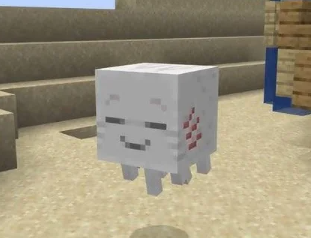
Snapshot Feature
How to Install Snapshot 25w15a
Before you can experience the Happy Ghast, you'll need to install the Minecraft Java Snapshot 25w15a. Here's how to do it:
- Open the Minecraft Launcher
- Click on the "Installations" tab at the top of the launcher
- Enable snapshots by checking the box that says "Snapshots" under the "VERSIONS" section
Note: Minecraft will display a warning about snapshots being experimental. This is normal - snapshots can contain bugs and may corrupt your worlds.
- Click the "+ New installation" button
- In the "CREATE NEW INSTALLATION" window:
- Give your installation a name (e.g., "25w15a Happy Ghast")
- From the "VERSION" dropdown, select "25w15a"
- Choose a game directory (or leave as default)
- Click "CREATE" to save your new installation
- Return to the "Play" tab and select your new snapshot installation from the dropdown menu
- Click "PLAY" to launch the snapshot
Important Safety Tips
- Always back up your worlds before opening them in a snapshot
- Consider creating new worlds specifically for testing snapshot features
- Snapshots may contain bugs that could corrupt your save files
- Worlds opened in snapshots may not work properly if later opened in older versions
What is the Happy Ghast?
The Happy Ghast is an exciting new mob introduced in Minecraft Snapshot 25w15a. Unlike its hostile counterpart from the Nether, the Happy Ghast is a friendly, rideable mob that can transport up to four players through the air. It can also serve as a floating platform for building structures in the sky, eliminating the need for traditional scaffolding.
Key Features
- Can carry up to 4 players at once
- Serves as a floating platform for building
- Controlled by looking in the direction you want to go
- Can be customized with different colored harnesses
- Follows players when holding snowballs
What You'll Need
- Dried Ghast (found or crafted)
- Water bucket (for hatching)
- Snowballs (for growth and attraction)
- Materials for Ghast Harness (wool and leather)
- Shears (optional, for removing harness)
How to Get a Dried Ghast
The first step to getting your own Happy Ghast is to obtain a Dried Ghast. There are two methods:
Method 1: Find a Dried Ghast in the World
Dried Ghasts can be found naturally in Salt Sand Valleys near bone fossils. Look for these distinctive biomes and explore around the fossil structures to find a Dried Ghast, which you can mine and collect.
Method 2: Craft a Dried Ghast
If you're having trouble finding a Dried Ghast in the world, you can craft one using:
- 8 Ghast Tears (arranged in a circle in the crafting grid)
- 1 Bone Block (placed in the center)
Crafting Recipe: Dried Ghast
GT = Ghast Tear, BB = Bone Block
Hatching a Ghastling
Once you have a Dried Ghast, follow these steps to hatch it into a Ghastling:
- Place the Dried Ghast on the ground
- Waterlog it by placing water on it (right-click with a water bucket)
- Wait for it to hatch (takes up to 20 minutes)
You'll know the process is working when you see particles coming off the Dried Ghast.
Crafting a Ghast Harness
While waiting for your Ghastling to hatch, craft a Ghast Harness using:
- Pink Wool (or any color wool for different colored harnesses)
- Leather
The exact crafting recipe arrangement wasn't specified in the provided information, but it likely follows a pattern similar to a saddle or horse armor.
Growing a Ghastling into a Happy Ghast
Once your Dried Ghast has hatched into a Ghastling, you have two options:
- Fast method: Feed the Ghastling snowballs by right-clicking on it with snowballs in hand. This will make it grow quickly into a Happy Ghast.
- Natural method: Wait approximately 20 minutes for the Ghastling to naturally grow into a Happy Ghast.
Riding and Controlling Your Happy Ghast
Once you have a fully grown Happy Ghast, here's how to use it:
- Apply the harness to the Happy Ghast by right-clicking on it with the harness in hand
- Right-click on the harnessed Happy Ghast to mount it
- Control direction by looking where you want to go:
- Look up to ascend
- Look down to descend
- Look in any horizontal direction to move that way
- Press the sneak/crouch key to stop moving and stand on top of the Happy Ghast
- Jump off when you want to dismount
Building Tip
Managing Your Happy Ghast
Removing the Harness
If you want to change the color of your Happy Ghast's harness, you can remove the current one by using shears on the Happy Ghast.
Calling Your Happy Ghast
If you dismount your Happy Ghast and want it to come back to you:
- Hold out a snowball in your hand
- The Happy Ghast will be attracted to you and come toward you
- Once it's close enough, you can mount it again
Happy Ghast Behavior
When not being ridden, a Happy Ghast will:
- Stay near the location where a player last interacted with it
- If never interacted with, stay near where it was hatched
- Be attracted to players holding snowballs
Multiplayer Usage
One of the most exciting features of the Happy Ghast is its ability to carry up to four players at once. This makes it an excellent transportation option for multiplayer adventures and collaborative building projects.
Quick Reference Guide
Getting a Happy Ghast
- Find/craft a Dried Ghast
- Waterlog it and wait for hatching
- Feed Ghastling snowballs to grow
- Apply harness to ride
Controlling
- Look direction = movement direction
- Crouch = stop and stand
- Hold snowballs to attract
- Use shears to remove harness